Erstwhile Muse
Apr 18, 2007
So what's on your thumb?
I told you I'd get around to it…eventually.
I promised I'd get around to mentioning the software I have installed in my thumb drive back when I was discussing my distraction by Lego mod, but until recently I was still lacking a suitable text editor that had all the features I was looking for. I've recently solved that problem, although not quite in the way I had originally intended, so I figured I'd kill a little bit of time between classes and work to put up a list of the portable apps I carry with me. I'll just go through the list as they appear in the start menu application I use, complete with the groupings I use for organization. As much as possible, apps listed here will be Open Source, and since the environment I use most often is a Windows one, they will be WIN32 native if they are not fully cross platform.
First off I should mention the start menu app itself, which is PStart. While not Open Source per se, it is freeware, and can easily be made to run from the Autorun menu on Windows machines that are setup for it (which is most by default). The panel can be handy for some informational views, but I prefer just to use the System Tray icon to access the programs as it doesn't require anything to be on top. On to the rest of the apps…
Internet
- Firefox
I actually use two versions of this depending on what system I am using. I keep a copy of Firefox 1.5 on my thumb drive, with Firefox 2.0 installed to my network drive on the school computer system. Having a copy on my network drive is a handy way to save my thumb drive from some of the memory thrashing that can occur on data heavy pages, which is useful for extending the life of most flash memory devices.
- Miranda
I just realized I haven't actually used this much as of yet. Miranda is the best multiple protocol instant messenger client I've found out there, at least for my purposes. Basically it won out over other options by being infinitely more customizable, although this is at the expense of convenience. So I've been a tad lazy about getting all the plugins and such that I use at home dropped into the plugins folder of my portable install, as well as the relevant OpenSSL files, and as a result this is currently just taking up space. This is more of a user issue than a software one though. I think I'll make a point of fixing this issue once I am at home, at which point I will append the name and links for the plugins I like to use.
On a slightly digressive note, for those not interested in quite such rigorous setup procedures, there is also GAIM (apparently now known as Pidgin in its main form). This is the program I had been using before switching over to Miranda, and at the time it did not have a metacontacts (multiple login names for the same person combined as one entry) function, although it would appear that has been recently added. It also looks a whole lot better than it used to graphically, so I might have to load this up on the lappy and give it a test run.
- Filezilla
I used to use this more when I was working on the school newspaper, as half the files that were used in the production of each weeks paper resided on a FTP share managed by our publisher. The other half were of course passed around in a terribly inefficient fashion via email, but I digress. It's never a bad idea to have an ftp client handy, although the fact that the IT goons at school have added such things to their ProgKill list makes it less useful than it might otherwise be. I used to be a bit peeved about this, as it made getting the paper done each week a pain in the ass (I ended up just working on one of the Macs and downloading the files via Firefox, which is not nearly as easy); now I just think it's a retarded knee-jerk move that annoys me but no longer really affects me on a regular basis.
- µTorrent
Like I've said before, I prefer to use the standalone version of this app as it is easily portable, with a little bit of setup. I don't use this one terribly often right now as most of my non-home computing is on school computers where I don't really have space to be downloading huge swathes of data, but it's nice to know that I have the capability to access BitTorrent downloads wherever I go. The program is pretty damn small, so why not have it along?
Writing Tools
- UltraEdit
UltraEdit is neither Open source (it is closed source, retail software), nor is it inherently portable. Why am I including it then? Well, because it is the text editor of choice for me at the moment (this very post is being composed in it, running from the thumb drive) due to a feature I have grown accustomed to and not found a suitable replacement for, that being the tag list that I use quite extensively for my most frequently used (and custom) HTML tags. The version I am using currently, 10.00b, can be made to work portably by copying the entire folder from a stationary install of UltraEdit to the thumb drive, moving a copy of the uedit32.ini file to the same folder, and modifying a few lines in the .ini file by changing them from specific directory references (i.e. C:\Program Files\UltraEdit\etc…) to relative references (i.e. ..\UltraEdit\etc…). This is not foolproof—on several occasions now I have had it lose track of where my tags list is if I go to add a new tag to the list while editing a file, forcing me to close the program and reopen it. It's a minor issue, and the only one I've encountered so far, so I'm willing to live with it.
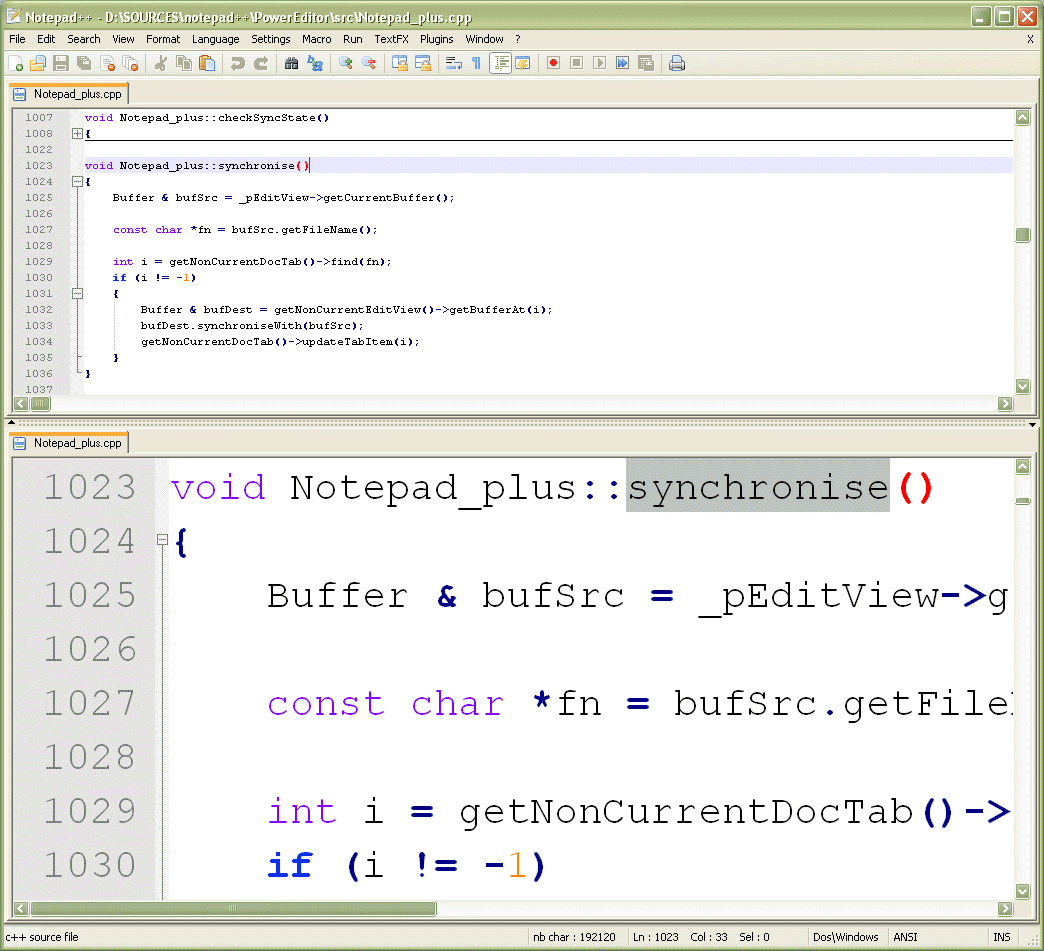
There is an Open Source text editor out there that is easily portable that I would suggest those of you not tied down to a specific methodology try. It's Notepad++, and the .zip file version should be all you need to get up and running. It has a lot of features I was looking for like syntax highlighting and such, and a few I wasn't looking for but which are kind of handy anyways like text zooming. If I could have found a plugin for Notepad++ that worked the same way that the tag list in UltraEdit does I'd probably be using that instead, but as is no such thing exists and I'm too entrenched in my ways at the moment to change.
- Open Office
Sure, it's a huge bloated hog that takes up over 200 megabytes of space on my thumb drive, but when you need to read Microsoft Office files or produce something similar, it's easier to have around than to go searching for it when the need arises. That being said, if I find enough other bits and bobs of software that strike my fancy and put me short of space, I may consider taking Gigantor here off.
- Scribus
Portable, Open Source page layout/desktop publishing software? Me likey…
Programming
- Portable Python
I have only begun to scratch the surface of this particular implementation of the Python language, so I am not yet sure how useful it will be in learning the language. But it's better than nothing I'd say…
Multimedia
- VLC Media Player
If you can't play it with VLC, you probably don't need to watch it (or listen to it as the case may be). Especially handy for watching .mov files without having to deal with the craptasticness of the Quicktime Player—why Apple can't be bothered to include a full screen (full screen, not maximized window) playback option is beyond me…
- Xnview
My personal choice for basic image manipulation like cropping, rotation and gamma issues, and for sorting and viewing images. Download the .zip file version, unpack and you're good to go.
- Audacity
Ask anyone for input on audio editing programs and Audacity inevitably comes up for discussion. And with good reason, it's a pretty handy free, open source sound editor. How often do I have need to use it? Almost never, but you never know when it might come in handy. Pair the availability of the program with the old
Headphones as Microphone
trick (not terribly hard as I almost always have a cheap-ass pair of earbuds at hand), and I can theoretically record sound whenever or wherever I wish, as long as quality isn't an issue—this is a hardware issue, not software. As proof, here is a very crappy sound file of me coughing into my earbuds recorded in the school computer lab as I write this (hard to make any other sounds and not be conspicuous).- Blender
Honestly I have no freaking clue why I still have Blender installed as a portable app, I rarely have the time to sit down and futz with a 3D rendering application whilst on the go. I think it was one of those
Oooh, Ooh…look what I can install!
kind of decisions that I just haven't reversed yet.- GIMP
The GNU Image Manipulation Program, otherwise known as The Program with one of the Worst Acronyms Possible (although TPwootWAP is pretty bad too), is nice to have on hand as I never quite know when a fierce photoshoppin' might come upon me…
Utilities
- 7-Zip
Easy to use archive file decompression tool, always handy to have on hand just in case.
- Sunbird
Sunbird is Mozilla's calendar application. I don't use this as often as I should, and it takes a while to get up and running from the thumb drive, but it works well once it's fired up.
- PhiBar
PhiBar is an odd little widget I keep around mostly for my own amusement. It is ostensibly a color picker program such as you would use for designing websites and such. The difference though is that it focuses on displaying the relationship between three colors in terms of a ratio of 1:Φ (otherwise known as Phi or the Golden Number to those of us that don't read Greek symbols on a regular basis). I have a particular fascination with Φ and it's relation to art and design, so I like to have this handy just in case inspiration strikes.
Under Consideration
- Portable Celtx
I haven't yet installed this, but I came across it earlier today in a fit of curiosity. Celtx is an Open Source screen writing and pre-production organizational package that I've mucked about with a bit at home as part of my intermittent attempts at stop motion animation via brickfilming. I figure I'll give it a try and see how it works.
So that's what I have on hand at the moment, although as you can see from several of the commentaries and the Under Consideration category, this is by no means a static configuration. If I find anything particularly interesting that I add, I'll do my best to add updates, although I make no promises as to the updates being terribly timely.
Labels: software
0 Comments:
Jun 11, 2005
Where the hell was THAT in the manual...
Oh wait, there was no manual.
Well, butter me in olive oil and call me petunia...
I'm all for learning software by using the software in question. That's the way I go about most things, and for the most part it works pretty well for me. Every once in a while, I'll check out a tutorial or two, or browse through the help file, or even (heaven fobid) an actual manual—or it's electronic equivalent. But for the most part, once I have the abstract concept down from another source I need to put it into practice to firmly cement the concept into my head.
Most of the time this works out pretty well, but it doesn't really help out with what one might call undocumented
features. Kinda like the one I found tonight by pure blind accident, one which makes Firefox even cooler than it had been previously.
A little background into my search for alternatives to the shitastciness that is IE is neccessary for this to be of even marginal interest to most of you, as I am sure most of my dear readers (all 3 of you) do not have cause to use most of the features that I now take for granted in a decent browser. One of these features is Text Zooming.
Text Zooming, for those who have not tried it is a marvelous feature that was originally designed as an accessibility feature to make pages render better for those with vision problems—kind of like large print books for the internet. In theory, it also works the other way around, and allows you to shrink text that you might find overly large, but I very rarely think anyone would have cause to use that aspect of it, given usual trends in text sizing in overall web design—which, in general, suck balls.
I use this fabulous feature of all Gecko based browsers because I am at times a lazy git, and like to lean way back in my fatty-bo-baddy arm chair and read articles at length on my big ass CRT. Arms length that is, as the only part of me even remotely close to the screen and/or keyboard is one hand to scroll and use the back button. Sometimes my feet are also in close proximity if I'm being a truly slothful bastard, but as I have not yet bothered training myself to type with my feet, these are of little help. What is helpful is being able to crank up the text size from microscopic sizes lacking in discernable contrast to something more rational for my environment, even if it would resemble billboard type on most systems.
Now of all the browsers I have tried, K-Meleon was the Moz spinoff that I thought had the best text scaling;it's granularity made it terribly easy to get any page to look decent at sizes that I wanted. It was actually one of the features that cause me to originally be reluctant to switch from over to Firefox—I wanted the tabbed browsing, but didn't want to lose my perfect text scaling and convenient Google Search keyboard shortcut. True, Firefox does have the built in search bar, but it's shortcut isn't as automatically recognizable as K-Meleon's (Ctrl+E as opposed to Ctrl+G).
During my last rebuild, I went ahead and grabbed Firefox instead of K-meleon for my main system in order to give it a true test, and of course became a tabbed browsing junkie in short order. This of course meant that, for the most part, Firefox was there to stay as my main browser. One thing I sorely missed however was the granular text zoom that K-meleon had, as Firefox seemed to use some variation of sizing things up by CSS keyword sizing, or perhaps by the scale method used for relative font sizing keywords such as larger and smaller. This does not always produce pleasing results, depedning on the page involved and the underlying style.
When am I going to get to the fucking point you ask? Excellent question, the answer to which would be—right now. The reason I had been previously disappointed with Firefox's text zoom was because I was used to using keyboard shortcuts, which in this case is Ctrl++ to increase size and Ctrl+- to reduce. These are the same shortcuts as used by K-meleon, so I had become familiar with them. But, there is another way dear readers...oh yes, there is most definately a better way! By holding down Ctrl and using the mouse scroll wheel, you can change the text zoom much more granularly—quite like the old, superior method I had been used to in K-meleon.
Oh frabjous joy says I! Oh wonderful glee! Now of course I may have to ponder remapping my 5th mouse button to Ctrl as oppsed to Forward in order to be able to control text zoom with one hand for those day of epic sloth in which two hands is just really too much effort...
Now all I have to do is figure out how to get Firefox to have the same sort of Image Zoom options available via right-click context menu that K-Meleon had for the other variety of one-handed surfing and I'll be all set.
Labels: software
0 Comments:
Aug 12, 2004
The Stupidity of Filtering.
Real Life Adventures of pseudo-porn at the library.
Have I ever mentioned how much I hate not administering my own network connection? Perhaps not, but rest assured, it drives me absolutely batty at times.
Let's use today as a perfect example of why this is the case, shall we? It began with my trip to the coffee shop to abuse their internet connection yet again. Unfortunately for me, the connection was down, more than likely simply at the cable modem. At some point the wireless access as a whole disappeared, so I am guessing that the management assumed it was a router issue, and tried to reset their hardware in a quick attempt to remedy the problem. This gave me momentary hope that perhaps, if I suggested that they power cycled the modem as well, this might alleviate the bottleneck—then visions of blank stares began swimming before my eyes, and I just said to hell with it, time to head to the library.
Now, I already knew that the library had some sort of filtering mechanisms in place, being part of a federal funding mandate and all. I didn't think this would have any effect on my internet time today—it's not like I was looking for any more research
materials. I'd already spent several hours recently—over the course of several days mind you, I'm not that erm...dedicated—sorting, organizing and reaquainting myself with what was already on my hard drive(s). A little emailing, some Ruth taunting, and a little odd news reading was all I was looking forward to, really.
What I end up with as a bonus is a perfect example of the fallacy that is internet filtering. During my daily BoingBoing read, I tried to check out a link they had to a series of photoshopped remixes blending the current political race with the ass of a movie otherwise known as Aliens V. Predator. What I got instead was a nicely customized error message screen leaving me with two options:
- I could temporarily view the webpage by asking a library staff member to bypass the filtering for me, or
- I could hit the back button and browse the non-naughty parts of the internet.
unlockthe internet for me—a concept that galls me to merely type, let alone actually perform. In doing so I was at least able to find out that their filtering service is being provided by Sentian, so at least I know what to research in the future for further mockery. Taking a stab in the dark though, I am going to guess that the Sentian product in question performs it's filtering through blacklisting, not any sort of actual, shall we say, content recognition. I can only assume that's why Mr. Bonner's main page is also blocked, while I can quite easily get to another BoingBoing linked site that caught my eye, the one selling the bondage beanbag chair—now that one was strictly for academic purposes mind you.
That's right kids, you can't go and look at certain forms of political satire at the library, but you can certainly bring up very large images of scantily clad females astride rather largish sex toys. I am almost considering leaving the site for the bean bag chair up when I leave, just as my own little bit of Discordian preaching for the day.
Labels: software
0 Comments:
Random Photo
Radio Free Kingboy
Mobile Musings
Links
Markup Gurus
Friends and Neighbors
Points of Interest
Webcomics
- 8-bit Theatre
- Butternutsquash
- Chugworth Academy
- Diesel Sweeties
- Dresden Codak
- Grim Tales From Down Below
- Gunnerkrigg Court
- Mac Hall
- Megatokyo
- Nobody Scores!
- Penny Arcade
- Scary-Go-Round
- Sinfest
- Something Positive
- Three Panel Soul
- Twisted Kaiju Theater
- Questionable Content
- V.G. Cats
- Wapsi Square
- xkcd
- The Zombie Hunters
Archives
By Topic
- biking
- BitTorrent
- coffee
- Columbus
- comics
- design
- games
- girls
- hardware
- hyper
- language
- Lego
- modding
- monkeys
- music
- netcasts
- perversions
- philosophy
- politics
- public transportation
- random
- ruminations
- school
- site design
- software
- sushi
- steampunk
- technology
- tesla
- travel
- typography
- undead
- work


 del.icio.us