Erstwhile Muse
Apr 13, 2007
Primitive Pixel Pushing
No, I'm not talking about MS Paint…
Lego Creator Mosaic as icon design tool
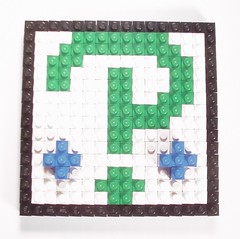
Sample 16 × 16 icon design using 1 × 1 Lego bricks as pixels. Note the second editing layer utilized for the blue dots (later dropped from the final design).
I'm talking about plastic bits as opposed to electronic ones. Lego bits in particular, as 1 × 1 bricks make a wonderful analog er, well…analogue for pixels. Why Lego (again) you ask?
It was really one of those lucky happenstances of the thought process. Last night I had been doing a bit of research into hosting a favicon for blogspot.com hosted Blogger sites. Normally all such sites show up with the default orange and white rounded B
icon that's the Blogger trademark, but there's nothing inherent in the code to prevent you from linking to a more personalized icon somewhere else. Sadly, as I was reacquainted with last night, free web/file hosting is really a hideous morass of nightmarish sites with onerous terms of service involving what you can do, what you can't do and how much advertising and spam they are going to try and shove your way in the meantime. I gave up on that aspect and focused on the actual graphic design as I had not yet decided what exactly I should use as an iconic representation of the ol’ Muse.
Out I went looking for inspiration. I don't recall which site in particular triggered it, but I do remember seeing an example that was basically a reddish-orange exclamation point. Of course
I says to myself, my old friend the Interrobang would be perfect! If only I weren't so *yawn* tired I'd…work on it right *zzz*…now.
Rather than fall asleep at the keys, I gave into the temptation of a nice soft warm bed.
In a half awake state I stumbled towards bed thinking about how I'd go about creating the 16 × 16 image I'd need when the inspiration hit me—the Creator Mosaic kit! The standard Lego baseplate is a 32 × 32 stud configuration, smaller ones are often an even divisible of that, and the Mosaic set had a cool transparent one included. Lurching over to grab the baseplate and count up the studs, I found that yes indeed, it was a perfect icon designing workspace of 16 × 16 studs. Woot! I dumped out my containers of 1 × 1 bricks in a variety of colors and got to designing right there in bed. I probably should have fallen asleep, but inspiration had struck, and the muse must be heeded when she calls.
Now with Layers!
Pixel design with Lego bricks has definite benefits; no electricity is needed, it can be done anywhere you have space to dump out some 1 × 1 bricks, and it comes with the inherent layering ability (unlike Photoshop which lacked this ability until version 3). Depending on your inventory, a rather wider variety of colors is available than most people would initially think possible. This of course points out one of the obvious weaknesses of graphic design via Lego—your inventory can restrict your options. That is why the image above of my initial icon design is radically different in color from the final image (which should be live by the time this entry is posted). In my case this was little problem as I was more concerned with pixel placement than coloration, but I may have to use it as justification for purchasing the larger mosaic set since it contains a decent amount of both the orange and lime green(colors very similar to those used in my current site design) 1 × 1 bricks. Undo/Redo functions are also significantly more time consuming processes to engage in, but I guess that's the tradeoff for portability.
Having wasted valuable sleep time working out the design the night before, creating the icon in Snico Edit the next morning was fairly easy, but I was still no closer to implementing it on site for want of a hosting solution. Luckily my google-fu mojo had been somewhat refreshed by a bit of rest, and I happened across the article entitled Adding Favicon icon to Blogger URL
. The title of the article is not particularly unique (although it is succinct and to the point), but it had a particularly valuable insight into hosting the icon image that made it a worthwhile find. In its ever expanding range of services, Google has added Google Page Creator to the Google Labs. In addition to allowing every Alice, Bob and Charlie to make a random web page about their pet parakeet or terribly mundane vaction, Page Creator allows you to upload files to Google's servers for use on such pages. It's also quite possible to utilize these files elsewhere, and since Blogger and Blogspot are also Google owned properties, I figure there's really no harm in doing so on this site.
Labels: Lego, site design
0 Comments:
Apr 8, 2007
Talismans of Geekery
I partially blame Chris for this…
I don't recall precisely how the topic was broached on Friday night while we were monopolizing the side room of Kafé Kerouac during Molly's show opening—I have a feeling it had to do with my typographic geekery during last quarter in relation to Oral Interpretation—but somehow I got onto the topic of the Open Source desktop publishing software Scribus. Chris seemed to have a particular interest in it, and wanted me to send him the link. I got it into my head that instead of that singular bit of knowledge sharing, I should just write a bit about the sort of stuff that I keep on my person and use on a daily basis via my thumb drive, as Scribus is one of those very programs.
My plan had originally been rather simple; plug my normal thumb drive in to reference the programs I use from there, and look up the appropriate links to share with those scant few readers who pass by here. Remember that bit they say about the best laid plans of men and all that? That all arose before the giant time sink we know and love as the Internet came into existence. As opposed to the Imp of the Perverse, I was instead seized by my old pal the Imp of the Infinite Hyperlink, the one who whispers little noodlings into your ears to check out just one more link, just one more search, one last click. Thus it was that several hours after I had begun my research on Saturday morning I found myself not with a list of handy hyperlinks, but a stack of pernicious questions and half formed ideas.
The problem largely arose from two loosely connected facts:
- My primary thumb drive, the one containing all of these terribly useful programs and widgets is a wonderfully economic 1 GB model from Microcenter. Of that capacity, I currently use about 70-75% of it simply for applications, leaving me with around 300 megs or so for document storage. So far it has not been a problem containing my school work in such space, but it does limit me somewhat in other respects (or at least contains within it the possibility for limitation). I could upgrade to Microcenter's 2 GB version, but to be perfectly honest, I lack the desire to spend the cash and then load everything up onto a new drive.
- Resting amongst the scattered technological detritus and Lego pieces that comprise the landscape of my desk was another 1 gig thumb drive missing a cap to cover the usb interface plug, and so somewhat unsuitable for the usual environs of lint filled pockets in which they spend most of their traveling time.
The ideal solution to this perceived lack of storage space would be to have both drives available at any given time. Technologically this shouldn't pose much of a problem from an interface standpoint, as most of the computers that I would be using them on(namely school lab and library computers—i.e. not my own) have two available ports as a default. But I'd really rather not have two seperate sticks of plastic hanging off of my keys, especially with one begging to act as a rececptacle for cotton fibers, sloughed skin and other components involved in the daily accretion of modern day mung. If only there were a way to package them into a compact unit that could be combined for transport yet seperated when needed, some sort of readily accesible form of industrial plastic that could be made into a new casing for both drives that would protect the circuitry and enhance functionality. Hmmm, where might I be able to find such a thing on short notice?
Eureka!
From the Department of Sharp Stabbing Foot Pain as Inspiration
The idea is not new, others have done it before me, some larger, some smaller, but as in all things it is the details of the execution that make the difference, and a few of mine are rather snazzy if I do say so myself (which I just did). Behold the Kingboy Deluxe Edition Stackable Brickdrives!


The specific details I am rather proud of are the key lanyard attachment formed by using a 3×2 modified plate with hole, the Trans-Clear 1×2 brick at the rear of each drive so that the read/write blinkenlights can be seen (as well as extending the main case for ease of circuit board insertion), and the fact that since the two drives are intended to travel snapped together in that rather handy way that Lego bricks are designed to do, there is no need for additional plates or other methods of securing the end caps that have been used in other such projects. The bonus is that it turned out rather stylish looking with the color coded end caps, matched to each drives LED color, which also rather conveniently snap to the top of the drive while in use to prevent any loss.
Someday soon I may actually get around to finishing the list of software I use on the green-capped apps drive; perhaps by that point I may have completed my search for the perfect portable text editor with a tag list feature similar to UltraEdit (which is what I write most of these entries with while at home). Until then, the search continues, but at least now I can worry less about running out of space….
Labels: hardware, Lego, modding
3 Comments:
 Unknown said...
*tilts head to side and raises eyebrow*
hmmm….
Perhaps calling all of your potential readers primates with a propensity for keyboard bashing is behind the aforementioned lack of commenting?
…just maybe.
~ruth- Erstwhile Muse said...
Bah…
- Andrew McFerrin said...
Oddly enough, I happened to read this article while on break from my WAN Technology class last night. Everyone gathered round, and general consensus is (a) they're cool as hell, and (b) if I started carrying a couple around the halls of ITT you could probably make a few bucks selling the thing.
Jan 14, 2007
Monkey VS Robot
A head to head Lego review of epic proportions!
Well, of mini-epic proportions at least, as the two sets at battle today are the new Mini Animals and Mini Robots 3 in 1 Creator sets. Here to settle the eternal debate between simian and machine, at least in the ABS world, prepare yourself for:
| Monkey | Robot | Winner | |
|---|---|---|---|
| Overall Winner | The Monkey has a better range of motion,consists mostly of pieces in harder to find colors, and is generally a much more interesting model. Plus, comes with his own foliage. |
The Robot has some nice pieces for general inventory purposes, especially some of the transparent pieces and the phone handset, but the main model is not quite as interesting. |
Monkey |
| Main Model | A step up from your average minifig scale monkey, this Monkey is quite well articulated for a model of this size. The legs pivot both at the hips and the ankles, the arms rotate at the shoulder and bend at the elbows, while the head rotates at the neck and the mouth opens for pre-poo-flinging screeches. The tail is also mutli-segmented to allow it to bend up behind the Monkey and help him keep his balance. This is also the first of the mini Designer models that I have seen that comes with accessories to the main model, in this case a wall of leaves as a jungly backdrop. |
Like some of their previous mini-robot sets, the palette here is largely a mix of blue and white. Movement is a bit restricted compared to the Monkey; while the Robot can freely pivot at the waist, his legs and arms are significantly restricted in motion by his design, and there is no |
Monkey |
| Secondary Models | Well, the Monkey can instead be built as a Turkey (or, if you combined two of them, perhaps a Turkey-Monkey), or as brownish,er...sluglike, spinedy—something. Honestly I'm not sure what in the hell that third model is supposed to be in this one. |
The Robot can be built either as a shorter hunchback Robot with huge, over sized fiddler crab-like claw, or a creepy dino-bot looking sort of Robot. All in all though, more Robots, less indistinguishable slugs. |
Robot |
| Piece Count | 77 pieces, including a lot of brown and tan, always a good thing. |
77 pieces, mostly blue and white, with a bit of red. |
Tie |
| Extra Pieces | Every Lego set inevitably has extra pieces due to the way they are packaged. The Monkey ended up with three 1x1 round plates, one each in white, black and tan, and one black Technic friction pin. |
The Robot ended up only having two 1x1 round plates extra, one each in Trans-Neon Green and Trans-Orange. |
Monkey |
| Best Piece | This set comes with two pieces of vegetation for the monkey to hide behind, unusual includes in a non-minifig set this size. Brickfilmers, dioramists and other large scale builders can never have enough vegetation in my book. |
While the part name is unassuming, for my money this is the winner. Known also as a radio handle or telephone handset, while largish for minifg scale it is still useful and harder to get. Two of them in Dark Bluish Grey clinch this category for Robot. |
Robot |
| Packaging | Silver and translucent yellow plastic storage box package similar to the Tiny Turbos sets. Overall, not a welcome change from previous sets similar to this. |
Same as the Monkey, but red instead of yellow. Which makes more sense than yellow did for the Monkey as the Robot has a least a few red components, but is visually jarring. |
X-Pods
X-pods were cool...bring back the pods Lego! |


There you have it folks, this round goes to the simians. Stay tuned in case I get really bored again sometime and decide to pit the Constructicons vs. the Aerialbots. Er, wait a minute here, wrong continuity. I mean Mini Construction vs. Mini Flyers. I'm not sure that's as interesting as the perennial Monkey/Robot debates though....
Random Photo
Radio Free Kingboy
Mobile Musings
Links
Markup Gurus
Friends and Neighbors
Points of Interest
Webcomics
- 8-bit Theatre
- Butternutsquash
- Chugworth Academy
- Diesel Sweeties
- Dresden Codak
- Grim Tales From Down Below
- Gunnerkrigg Court
- Mac Hall
- Megatokyo
- Nobody Scores!
- Penny Arcade
- Scary-Go-Round
- Sinfest
- Something Positive
- Three Panel Soul
- Twisted Kaiju Theater
- Questionable Content
- V.G. Cats
- Wapsi Square
- xkcd
- The Zombie Hunters
Archives
By Topic
- biking
- BitTorrent
- coffee
- Columbus
- comics
- design
- games
- girls
- hardware
- hyper
- language
- Lego
- modding
- monkeys
- music
- netcasts
- perversions
- philosophy
- politics
- public transportation
- random
- ruminations
- school
- site design
- software
- sushi
- steampunk
- technology
- tesla
- travel
- typography
- undead
- work


 del.icio.us
